How to Set Up WooCommerce Buy One Get One Free (Buy X Get X)
Boost your store's average order value with compelling "Buy X Get X" offers. YeeDiscounts makes it easy to create powerful BOGO promotions where customers get the same product as a reward (e.g., Buy 1 T-Shirt, Get 1 T-Shirt Free).
1. Creating a New Rule
- Navigate to WooCommerce > Settings > Dynamic Discounts.
- Click Add New Rule.
- Enter a Rule Name (e.g., "T-Shirt BOGO Special").
- (Optional) Set a unique Rule ID or let it generate automatically.
2. Configuring the Discount
In the Discount Type section, select:
Discount Type:
Buy X Get X (Same Product)
This mode is designed for offers where the customer buys a specific quantity of a product and gets a reward quantity of the same product.
Setting Up Tiers (Ranges)
The plugin uses a flexible "Tier" system to define your Buy/Get logic.
- Click Add Range to create your first tier.
- Min Qty: The number of items the customer must buy to trigger the deal (e.g.,
1for Buy 1 Get 1). - Discount Type:
- Free: The reward item is 100% free.
- Percentage: The reward item is discounted by a percentage (e.g., Buy 1, Get 2nd at 50% off).
- Fixed Amount: The reward item is discounted by a fixed dollar amount.
- Value:
- If configuring a Percentage or Fixed Amount, enter the value
here (e.g.,
50for 50% off). - If Free, this value is ignored (automatically 100%).
- If configuring a Percentage or Fixed Amount, enter the value
here (e.g.,
- Recursive (Repeat):
- Check this box if you want the rule to repeat for every multiple of the Min Qty.
3. Filtering Logic (Who gets the deal?)
Use the Filter section to determine which products qualify for this BOGO offer.
- Filter Type: Included/Excluded Products, Categories, or All Products.
4. Common Examples
Scenario A: Buy 1 T-Shirt with Logo, Get 1 Free
- Discount Type: Buy X Get X
- Filter: Select specific product "T-Shirt with Logo" (Filter Type: Products, Operator: In list).
- Min Qty:
1 - Recursive:
Checked(Yes) - Tier Type:
Free - Result: When a customer adds 1 "T-Shirt with Logo" to their cart, the plugin automatically adds another 1 "T-Shirt with Logo" for free. They pay for 1, they get 2.
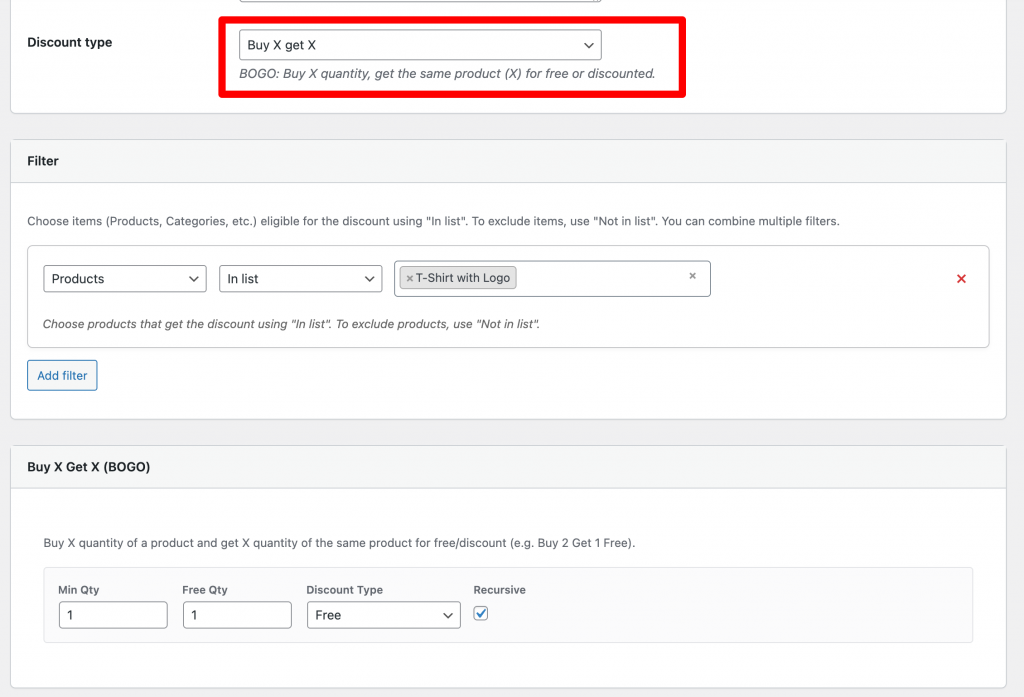
Setting backend
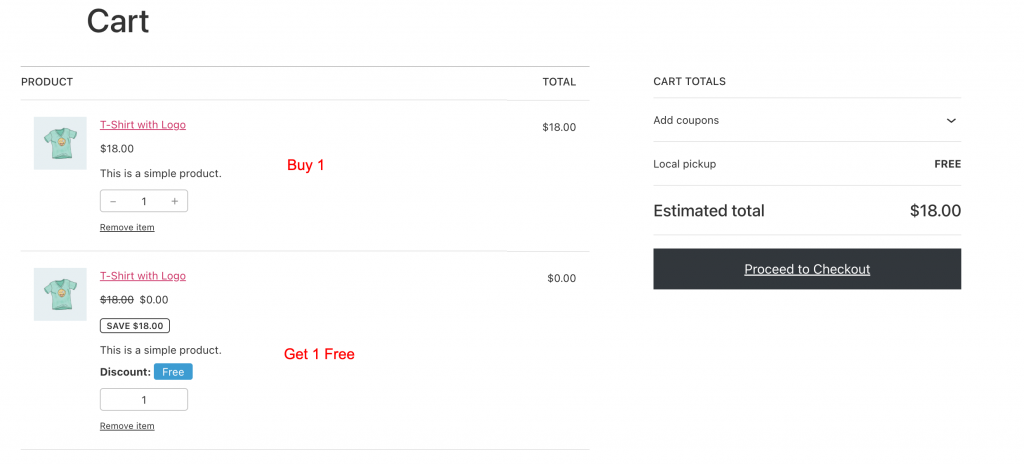
Cart page
Tip: Ensure your "Show on-sale badge" settings are configured to highlight these deals in
your shop!